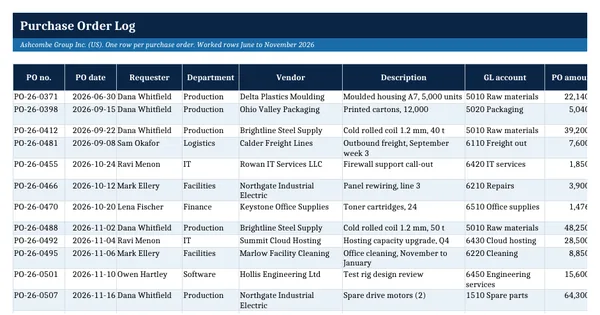
 Excel workbook preview
Procure-to-pay and accounts payable
Purchase Order Log
3 free downloads per account. Just your email and a 6-digit code.
About this template
A purchase order log is the list of every purchase order raised, who approved it, what has been received and invoiced against it and what is still committed. Finance needs it at month end to accrue goods received but not yet invoiced, budget holders use it to see committed spend, and auditors use it to test that purchases were approved before the order was placed and by someone with the authority to do so.
This log has 12 worked purchase orders for Ashcombe Group across six departments. Formulas look up the approver's limit, flag orders above it, work out the open commitment and the received less invoiced value, and mark after-the-fact orders where the invoice came first. A summary by department and status and a set of control figures update as you type. Supplier tax set-up follows the IRS guidance on Form W-9 and Form 1099-NEC.
Who it is for
The purchasing or finance lead who was asked for a list of open purchase orders and commitments for month-end accruals or the auditor.
What is inside
- PO log with 12 worked purchase orders across 6 departments plus 20 blank formatted rows
- Approval limit looked up from the approver role, with a Within authority check that flags POs to escalate
- Open commitment and received less invoiced calculated per PO, the second one feeding month-end accruals
- After-the-fact PO flag when the first invoice is dated before the PO, and red highlight on overdue deliveries
- Approval limits sheet with five roles and yellow input cells for your own limits
- Summary sheet by department and by status, live from the log
- Control figures: POs outside authority, after-the-fact share, accrual candidates, invoiced ahead of receipt and overdue deliveries
How to use it
Enter your approval limits on the Approval limits sheet, then log each purchase order on the day it is approved.
Files
- XLSXpurchase-order-log.xlsx16 KB
Opens in Microsoft Word or Excel, Google Docs or Sheets, and LibreOffice. Based on general finance practice, not on one published standard. A template to adapt, not legal, tax or accounting advice.
Questions about this template
What is the difference between a purchase order log and a purchase order tracker?
They are the same thing under two names: one row per purchase order with its status. A useful tracker also follows the money through the order, from approved value to received and invoiced value, so the open commitment and the accrual for goods received but not invoiced can be read straight off the sheet.
What is an after-the-fact purchase order?
It is a purchase order raised after the supplier has already delivered or invoiced, so the approval did not happen before the spending. It defeats the purpose of the order. The log flags any PO whose first invoice is dated before the PO date, and the summary shows how many there are as a share of all orders.
How does a PO log help with month-end accruals?
For each order the log subtracts the invoiced value from the received value. A positive number means goods or services arrived but the invoice has not, which is a candidate for an accrual. A negative number means the supplier invoiced ahead of receipt, which should be held in the three-way match until the receipt is recorded.