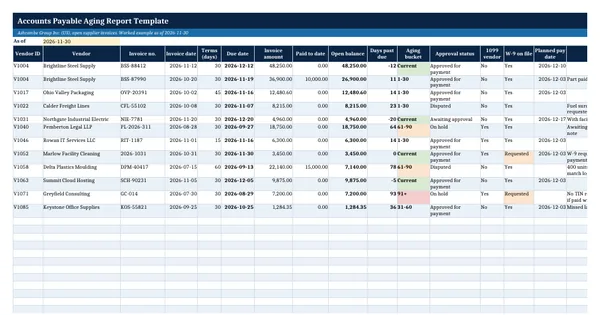
 Excel workbook preview
Procure-to-pay and accounts payable
Accounts Payable Aging Report Template
3 free downloads per account. Just your email and a 6-digit code.
About this template
An accounts payable aging report lists every unpaid supplier invoice on a given date and sorts it by how far past its due date it is. Auditors ask for it to test the payables balance, lenders ask for it in a borrowing base or covenant review, and a new CFO asks for it to see which suppliers are waiting for money. It is only credible when its total agrees to the accounts payable control account in the general ledger.
The workbook has an aging register with 12 worked invoices for Ashcombe Group, a summary by bucket and by vendor, a tie-out to the general ledger, days payable outstanding and two control flags. Every derived number is a live formula from one as-of date. The W-9 and 1099 columns follow the IRS Instructions for Forms 1099-MISC and 1099-NEC and the IRS page on backup withholding, so tax gaps show up before the payment run rather than in January.
Who it is for
The controller or AP lead who was asked by the auditor, the bank or the CFO for an aged payables listing that ties to the general ledger.
What is inside
- AP aging sheet with 12 worked invoices for 11 invented suppliers plus 20 blank formatted rows
- Due date, open balance, days past due and aging bucket (Current, 1-30, 31-60, 61-90, 91+) calculated from one as-of date
- Dropdowns for approval status, 1099 vendor and W-9 status, with colour on the 61-90 and 91+ buckets
- Aging summary sheet: bucket totals with invoice counts and share of total, live from the register
- Vendor table with the five buckets, total, share of AP and the amount on hold or disputed per supplier
- Tie-out of the aging total to the AP control account and a days payable outstanding calculation
- Control flags: approved invoices over 30 days past due and 1099 vendors without a W-9 on file
- How to use sheet with IRS references for W-9 and Form 1099-NEC
How to use it
Type the as-of date in cell B3 of the AP aging sheet, then replace the worked rows with your open invoices.
Files
- XLSXaccounts-payable-aging-report-template.xlsx16 KB
Opens in Microsoft Word or Excel, Google Docs or Sheets, and LibreOffice. Based on general finance practice, not on one published standard. A template to adapt, not legal, tax or accounting advice.
Questions about this template
What are the usual buckets in an accounts payable aging report?
Most reports show invoices that are not yet due as Current and then group the rest by days past due: 1 to 30, 31 to 60, 61 to 90 and over 90 days. This template uses those five buckets and works them out from the due date and one as-of date, so changing the date re-ages every invoice at once.
Why must the aging total agree to the general ledger?
The aging is a detail listing of the accounts payable control account. If the two differ, an invoice may have been posted outside the subledger, a payment may be unrecorded, or a manual journal may have hit the control account. The summary sheet shows the difference and marks it Investigate until it is zero.
Why does an aging report track W-9 status?
A supplier you will report on Form 1099-NEC needs a correct taxpayer identification number, which you normally obtain on Form W-9. The IRS says payers withhold at 24 percent when a payee has not provided a correct number. Flagging missing W-9s on the aging lets you collect them before the invoice is paid.