 Excel workbook preview
Procure-to-pay and accounts payable
Expense Report Template (Excel)
3 free downloads per account. Just your email and a 6-digit code.
About this template
An expense report is the claim an employee makes for business costs paid personally or on a company card. A good one lets the approver see the business purpose of every line, lets finance post each cost to the right account, and gives an auditor the receipt trail. When reports are loose, reimbursements of personal costs slip through and the accountable plan treatment of the payments is at risk.
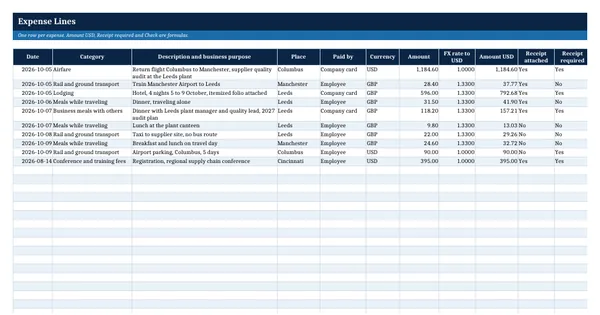
This Excel workbook has an Expense Lines sheet with currency conversion and automatic checks, a Mileage log, a Summary and Approval sheet with category totals, the cash advance and the net amount due, and a Settings sheet. The receipt threshold, the 60 day accounting period and the elements to record follow IRS Publication 463, and the mileage rates are the IRS 2026 business rates, kept as inputs you update each year.
Who it is for
The employee or finance assistant who needs a clean expense report that an approver and an auditor can follow line by line.
What is inside
- Expense Lines sheet with 10 worked lines from a Columbus to Leeds trip plus 20 blank formatted rows
- Live USD conversion, receipt required test and a policy check on every line
- Mileage sheet with 4 worked trips and 14 blank rows, rate chosen by date from the Settings sheet
- Settings sheet with the 2026 IRS business mileage rates, the USD 75 receipt threshold and limits, all as inputs
- Summary and Approval sheet: totals for 9 categories, mileage, company card, advance and amount due
- Dropdowns for category, paid by and receipt attached, with red and amber flags on problem lines
- Late line flag against the 60 day accounting period in IRS Publication 463
- Employee certification, approver and finance review sign-off block
How to use it
Check the Settings sheet first, then enter one row per expense on the Expense Lines sheet.
Files
- XLSXexpense-report-template.xlsx17 KB
Opens in Microsoft Word or Excel, Google Docs or Sheets, and LibreOffice. Based on general finance practice, not on one published standard. A template to adapt, not legal, tax or accounting advice.
Questions about this template
What should an expense report include?
Each line needs the date, the amount, the place and the business purpose, which are the elements IRS Publication 463 lists for travel and transportation. Add the category, how it was paid and whether a receipt is attached. The report also needs the employee's certification, the approver's sign-off and a total that reconciles to any cash advance or company card statement.
How is mileage calculated on an expense report?
Business miles are multiplied by the mileage rate the organization reimburses. Many US employers use the IRS business standard mileage rate. For 2026 the IRS set 72.5 cents per mile from January 1 to June 30 and 76 cents from July 1 to December 31. The workbook picks the rate by trip date from the Settings sheet, so check irs.gov each year.
Do I need a receipt for every expense?
Publication 463 asks for receipted bills for all lodging and for any other expense of USD 75 or more. Many organizations require receipts at a lower amount. The workbook flags any line that needs a receipt under the threshold set on the Settings sheet and has none attached, so you can change the threshold to match your policy.