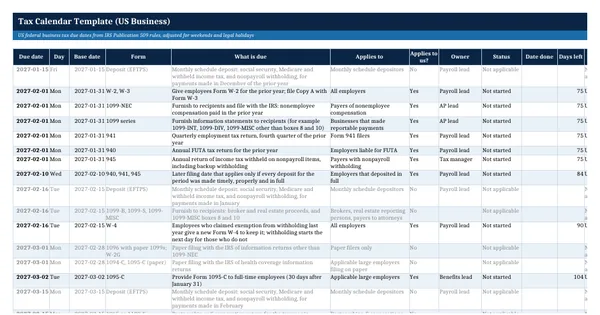
 Excel workbook preview
Tax Calendar Template (US Business)
3 free downloads per account. Just your email and a 6-digit code.
About this template
A tax calendar lists every filing and payment date a business has to meet in the year, so that nothing is missed between payroll, information returns, estimated tax and the annual return. It is often asked for by a new CFO, an auditor reviewing penalties, or a team taking over from an outside provider, and it is usually a list in someone's head or in last year's email reminders.
This workbook builds each date from the rule in IRS Publication 509, such as the 15th day of the 4th month after the tax year ends, and moves it to the next business day when it falls on a weekend or a District of Columbia legal holiday, which a Holidays sheet computes. Rows cover payroll deposits, Forms 941, 940, W-2, the 1099 series, 1095-C, 5500, corporate, partnership and individual returns, extensions and estimated tax.
Who it is for
The controller or tax manager who needs one list of every federal filing and deposit date for the year, with an owner against each.
What is inside
- 47 federal due dates for income tax, estimated tax, payroll and information returns, built from IRS Pub 509 (2026) rules
- Every date is a formula: change the calendar year or tax year end and the whole calendar moves
- Weekend and legal holiday adjustment with WORKDAY and a Holidays sheet that computes the 12 District of Columbia legal holidays for two years
- Status, owner, days left and an Overdue, Due soon, Upcoming or Done flag with colour coding
- Applies to us column to switch rows on or off; the worked example is set up for a calendar-year C corporation
- 16 blank rows for state and local due dates that adjust the same way
- Month view sheet with items due, done, overdue and still open per month
How to use it
Enter the calendar year and the last day of your tax year on the Settings sheet, then mark which rows apply to you.
Files
- XLSXtax-calendar-template.xlsx21 KB
Opens in Microsoft Word or Excel, Google Docs or Sheets, and LibreOffice. Built on free, official texts that anyone can read: laws, regulations, standards and guidance published by public bodies. A template to adapt, not legal, tax or accounting advice.
Questions about this template
What happens when a tax due date falls on a weekend?
IRS Publication 509 explains that when a due date falls on a Saturday, Sunday or legal holiday, an act is generally timely if done by the next day that is not a Saturday, Sunday or legal holiday. Legal holidays are those of the District of Columbia. The calendar applies this rule with a formula.
Does the calendar work for a fiscal year business?
Yes for income tax rows. Enter the last day of your tax year on the Settings sheet and the return, extension and estimated tax dates are worked out from it. Payroll and information returns follow the calendar year whatever your tax year. Pub 509 describes a different Form 1120 date for some June year ends.
Are state tax dates included?
No. The rows cover federal dates from IRS Publication 509. Sixteen blank rows at the bottom take state and local dates: type the base date and the calendar adjusts it for weekends and the holidays on the Holidays sheet, where you can add statewide holidays.