 Excel workbook preview
Order-to-cash and accounts receivable
Bad Debt Reserve Calculator (Aging Method)
3 free downloads per account. Just your email and a 6-digit code.
About this template
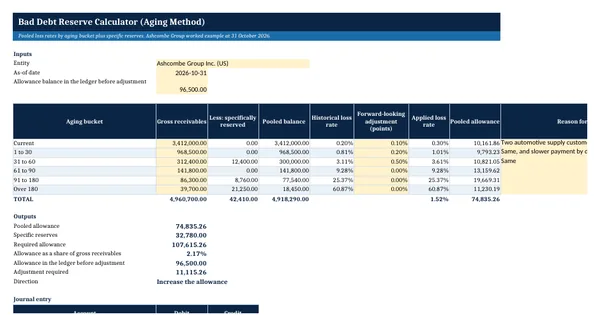
A bad debt reserve, also called the allowance for doubtful accounts or the allowance for expected credit losses, is the part of receivables a company expects not to collect. The aging method applies a loss rate to each aging bucket, because older balances are less likely to be paid. Accounts with known problems are reserved one by one, and the pooled rates cover the rest.
This calculator derives each bucket rate from four years of year-end balances and later write-offs, adds a forward-looking adjustment you explain, removes specifically reserved accounts from the pool and compares the result with the ledger. It then writes the adjusting entry. A note covers the US tax side, where IRS Topic 453 allows a business bad debt deduction only when a debt becomes partly or wholly worthless.
Who it is for
The controller or senior accountant who must support the month-end allowance for credit losses with a calculation the auditor can follow.
What is inside
- Calculator sheet with inputs, six aging buckets and a fully worked example that ties
- Loss history sheet with four year-end snapshots, write-offs, a historical rate and an override per bucket
- Forward-looking adjustment in percentage points per bucket, with a reason column
- Specific reserves sheet with 4 worked accounts and 16 blank rows, removed from the pooled balance
- Required allowance, coverage ratio, adjustment against the ledger and the journal entry as live formulas
- Input cells shaded yellow, outputs bold, with a How this is calculated note
- How to use sheet with steps and a note on the US tax timing of bad debt deductions
How to use it
Enter your four year-end aging snapshots and write-offs on the Loss history sheet before you touch the Calculator.
Files
- XLSXbad-debt-reserve-calculator.xlsx13 KB
Opens in Microsoft Word or Excel, Google Docs or Sheets, and LibreOffice. Based on general finance practice, not on one published standard. A template to adapt, not legal, tax or accounting advice.
Questions about this template
How do you calculate bad debt reserve using the aging method?
Group open receivables by days past due, apply a loss rate to each group and add the results. The rate for each group is usually the share of past balances in that group that were later written off, adjusted for current conditions. Accounts with a known problem get a specific reserve instead. The total is compared with the ledger balance and the difference is booked.
What is a good historical loss rate period?
Use enough history to cover a full business cycle of your customers, often three to five years of month-end or year-end snapshots. Too short a period can understate losses after a calm year. This calculator uses four year-end snapshots per bucket and lets you override a rate with a written reason when the history does not reflect current conditions.
Is the bad debt reserve tax deductible in the US?
IRS Topic 453 says a business can deduct a bad debt only when it becomes partly or totally worthless, only for amounts included in income, and only in the year it becomes worthless. A book reserve is an estimate made before that point, so the book expense and the tax deduction usually fall in different years. Ask your tax adviser.