 Excel workbook preview
Fixed assets and capital expenditure
Fixed Asset Physical Verification Checklist
3 free downloads per account. Just your email and a 6-digit code.
About this template
A physical verification of fixed assets checks that the assets in the register still exist, are where the register says they are, and are in a condition that supports their book value. Auditors ask when it was last done, and lenders with asset-based facilities may require it. Without it, the register can carry assets that were scrapped years ago, while new equipment on the floor never made it into the books.
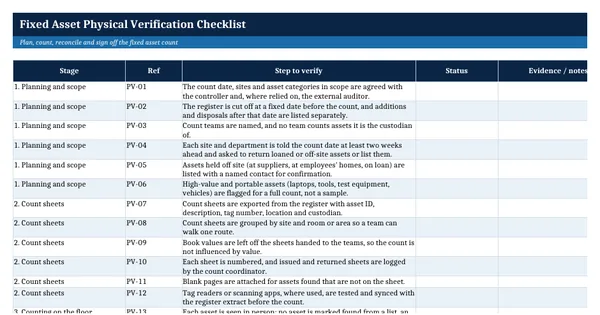
This Excel workbook has a 42-item checklist in seven groups, covering planning, count sheets, counting, tagging, reconciliation, exceptions and sign-off, with a status per item and a completion percentage. An Asset Count Sheet records what was found, where and in what condition, and a formula turns each result into the follow-up action. It is built on general fixed asset practice, with data-bearing equipment sanitized in line with NIST SP 800-88.
Who it is for
The controller whose auditor asked when the fixed assets were last physically verified, and who needs to plan, run and document the count properly.
What is inside
- 42 checklist items in 7 groups, from planning and count sheets to exceptions, write-offs and sign-off
- Status dropdown per item (Done, In progress, Not started, Exception found, Not applicable) with colour coding and a completion percentage
- Summary sheet with items and percent done per group
- Asset Count Sheet with 12 worked sample rows and 20 blank rows
- Result and condition dropdowns, and an action required formula for each count result
- Count summary block with counts per result, the net book value not found and the percentage located
- Freeze panes, filters and landscape print fit on every sheet
How to use it
Export your fixed asset register into the Asset Count Sheet, then work through the checklist from planning to sign-off.
Files
- XLSXfixed-asset-physical-verification-checklist.xlsx17 KB
Opens in Microsoft Word or Excel, Google Docs or Sheets, and LibreOffice. Based on general finance practice, not on one published standard. A template to adapt, not legal, tax or accounting advice.
Questions about this template
How often should fixed assets be physically verified?
There is no single US federal rule for private companies. Many organizations count all assets once a year, or count high-value and portable assets every year and the rest on a rolling cycle of two or three years. Choose a cycle your auditor accepts and record it in your capitalization policy. The register template that goes with this checklist flags assets past the cycle.
What happens to assets that cannot be found?
They are investigated first: checked against disposal records, transfers, repair loans and other sites. If the asset still cannot be found after the set period, it is written off with approval at the level the disposal policy requires, the register is updated and theft is reported where it is suspected. The count sheet in this template proposes that action automatically.
Should assets that are found but not in the register be added?
Usually yes, if they meet the capitalization policy. The fixed asset accountant traces the purchase invoice, confirms it was capitalized or correctly expensed, tags the asset and adds it to the register where needed. Items below the capitalization threshold are tagged only if your policy tracks them for security reasons.