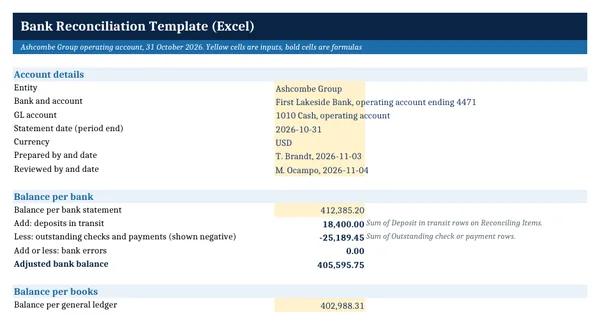
 Excel workbook preview
Bank Reconciliation Template (Excel)
3 free downloads per account. Just your email and a 6-digit code.
About this template
A bank reconciliation explains why the balance on the bank statement differs from the cash balance in the general ledger at month end. Deposits in transit and outstanding checks sit on the bank side. Interest, fees, returned items and recording errors sit on the book side and need a journal entry. Auditors and lenders expect one signed reconciliation for every account, every month.
The main sheet adds the reconciling items to each side and shows the difference, which must be zero. Items are entered once on their own sheet, and a lookup table sets their side and sign so the totals cannot be added the wrong way. A statement proof checks no page was missed, and a monthly log keeps the year together. It follows general practice, with IRS record keeping guidance cited.
Who it is for
The accountant or small business owner who has to hand the auditor, the bank or the controller a signed bank reconciliation for every month end.
What is inside
- Bank to book reconciliation with adjusted bank balance, adjusted book balance, difference and a Reconciled or Investigate result
- Reconciling Items sheet with 13 worked items and 20 blank rows: side, signed effect, journal entry flag and days outstanding by formula
- 7 item types on a lookup sheet that set the side and sign of every item
- Count and net effect of the journal entries to post, and the GL balance after posting
- Statement proof: opening balance plus credits less debits against the closing balance
- Outstanding checks older than your limit turn red
- Monthly Log with 10 month ends, difference, days to prepare, an on-time flag and the average
- How to use sheet with a worked example that ties to the cent
How to use it
Enter the statement closing balance and the general ledger balance in the yellow cells, then list each reconciling item with its type.
Files
- XLSXbank-reconciliation-template.xlsx18 KB
Opens in Microsoft Word or Excel, Google Docs or Sheets, and LibreOffice. Based on general finance practice, not on one published standard. A template to adapt, not legal, tax or accounting advice.
Questions about this template
What are the steps of a bank reconciliation?
Start with the closing balance on the bank statement and add deposits in transit, subtract outstanding checks and correct any bank error. Then start with the general ledger balance and add bank credits not yet recorded, subtract bank fees and returned items and correct any book error. The two adjusted balances must agree. Post a journal entry for each book side item.
What is the difference between a deposit in transit and an outstanding check?
A deposit in transit is money recorded in your books before period end that the bank credits after period end. An outstanding check is a payment recorded in your books that the bank has not yet paid. Both are timing items on the bank side. Neither needs a journal entry, but both should clear on the next statement.
How long should bank reconciliations be kept?
Keep them with the statements and journal support under your record retention schedule. The IRS page on how long to keep records says the general period of limitations is three years, with longer periods in some cases, and employment tax records at least four years. Lenders, grantors or regulators may require longer. Check the official page for your situation.