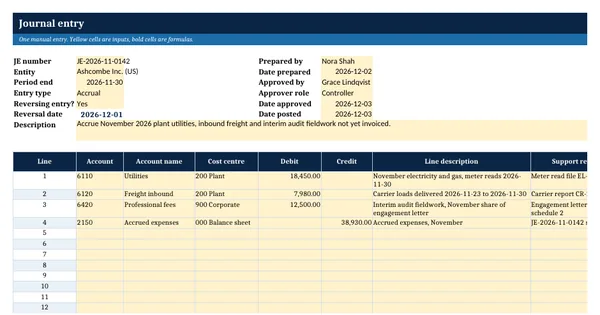
 Excel workbook preview
Journal Entry Template with Approval Log
3 free downloads per account. Just your email and a 6-digit code.
About this template
A journal entry template with an approval log gives every manual journal the same form and keeps one list of who prepared it, who approved it and when it was posted. It is what an accounting manager reaches for when the auditor asks to see the approval for a sample of entries, or when a new ERP has no workflow yet and approvals still happen by email.
The workbook has a journal entry form with live totals and a balance check, an approval log, an approval limits sheet and a summary. Every check is a formula: the required approver comes from the limits, and each log row tests balance, self-approval, approver level and posting order. It is built on general accounting practice, with an invented company, Ashcombe Group, in the worked rows.
Who it is for
The accounting manager who must show the auditor that every manual journal was balanced, supported and approved at the right level, and has only loose PDFs to prove it.
What is inside
- Journal Entry sheet: 15 lines with a worked 4-line accrual, live totals, balance check and reversal date
- Approval checks on the form: required approver from the limits, self-approval and level test
- Approval Log with 11 worked entries and 20 blank rows inside the formatted range
- Control check formula on each log row: unbalanced, awaiting approval, self-approved, level too low, posted before approval
- Approval limits sheet with 3 levels in yellow input cells that drive every check
- Summary sheet: entries by check result and by entry type, total debits and average workdays to approve
- Dropdowns for entry type, approver role and status, freeze panes, filters and print fit
How to use it
Enter your approval limits on the Approval limits sheet first, then replace the sample entries with your own.
Files
- XLSXjournal-entry-template-with-approval-log.xlsx18 KB
Opens in Microsoft Word or Excel, Google Docs or Sheets, and LibreOffice. Based on general finance practice, not on one published standard. A template to adapt, not legal, tax or accounting advice.
Questions about this template
What should a journal entry form contain?
A unique number, the entity, the period, the entry type, a description of what the entry does and why, each line with account, cost centre, debit or credit and a support reference, the preparer and date, and the approver and date. A reversing entry also shows its reversal date. The debits must equal the credits.
How do approval limits for journal entries work?
Each level of approver may approve entries up to a total debit amount. Above the limit, a higher level must approve. In this workbook the limits sit in three input cells, and the form and the log read them, so a change to a limit updates every check at once. Top-side and post-lock entries need the controller at least.
Why log journal entries if the ERP already records them?
Many ERPs record the user who posted an entry but not who reviewed the support or when. A log gives the approval evidence in one place, shows exceptions such as self-approval or an approver below the limit, and lets the controller review the month in minutes. Where the ERP enforces workflow, the log can be an export.