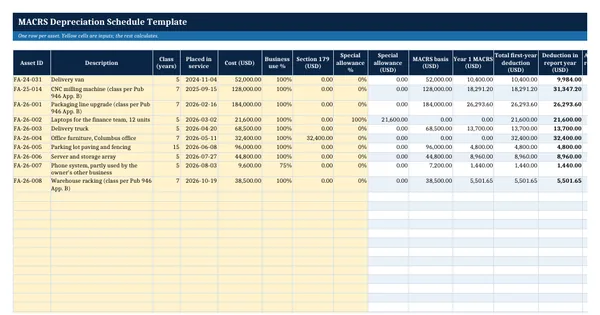
 Excel workbook preview
MACRS Depreciation Schedule Template
3 free downloads per account. Just your email and a 6-digit code.
About this template
A MACRS depreciation schedule shows the federal tax depreciation for each business asset, year by year, under the Modified Accelerated Cost Recovery System. It supports Form 4562, ties tax depreciation to the fixed asset register, and is one of the first schedules a preparer, auditor or new controller asks for. Most small and mid-size companies keep it in a spreadsheet next to the book depreciation.
This workbook applies the Table A-1 percentages from IRS Publication 946 (half-year convention, 200% or 150% declining balance) to each asset's basis after business use, Section 179 and the special allowance. It spreads every asset over 25 tax years, totals the deduction for any report year, and runs the 40% fourth-quarter test that tells you when Table A-1 no longer applies.
Who it is for
The tax accountant or controller who has to hand the preparer or auditor a tax depreciation schedule that ties to Form 4562 and keeps it in a spreadsheet.
What is inside
- Assets sheet with 10 worked assets and 20 blank formatted rows
- Table A-1 sheet with the half-year convention rates from Pub 946 (2025) for 3, 5, 7, 10, 15 and 20-year property, each column checked to 100%
- Section 179, special depreciation allowance percentage and business use percentage per asset, all as inputs
- Schedule sheet spreading every asset over 25 tax years by formula, with a lifetime check per asset
- Deduction in the report year, accumulated depreciation and remaining basis per asset
- Summary sheet with yearly totals and a 40% fourth-quarter test that warns when the mid-quarter convention applies
- Class, business use and special allowance dropdowns and highlights for failed checks
How to use it
Set the start year and report year on the Summary sheet, then enter each asset with its class, date placed in service and cost.
Files
- XLSXmacrs-depreciation-schedule-template.xlsx30 KB
Opens in Microsoft Word or Excel, Google Docs or Sheets, and LibreOffice. Built on free, official texts that anyone can read: laws, regulations, standards and guidance published by public bodies. A template to adapt, not legal, tax or accounting advice.
Questions about this template
What is Table A-1 in Publication 946?
Table A-1 gives the yearly MACRS percentages for 3, 5, 7, 10, 15 and 20-year property under the half-year convention. You multiply the unadjusted basis by the percentage for each recovery year. For example, 7-year property uses 14.29% in year 1 and 24.49% in year 2. The template holds the full table and checks that each column adds to 100%.
When does the mid-quarter convention apply instead?
Publication 946 says the mid-quarter convention applies when the depreciable bases of MACRS property placed in service in the last 3 months of the tax year are more than 40% of the total for the year, leaving out real property and a few other items. The template runs this test for the report year and warns you, because Table A-1 is then the wrong table.
Does the template handle bonus depreciation and Section 179?
Yes, as inputs per asset. You enter the Section 179 amount and the special allowance percentage, and the template deducts both in the first year before applying Table A-1 to the rest. Publication 946 (2025) describes the 100% allowance restored for certain property acquired after January 19, 2025. Check eligibility and limits for your year.