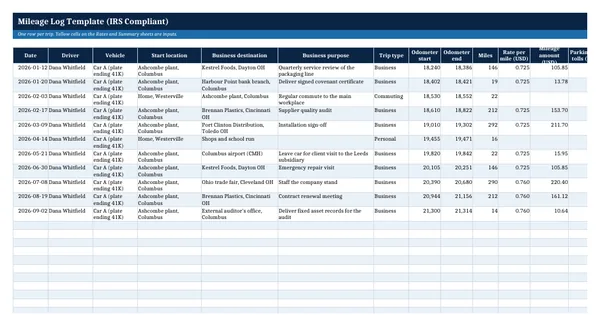
 Excel workbook preview
Mileage Log Template (IRS Compliant)
3 free downloads per account. Just your email and a 6-digit code.
About this template
A mileage log is the written record that proves business use of a vehicle. IRS Publication 463 asks for the mileage for each business use, the total miles for the year, the date of each use, the business destination and the business purpose, recorded at or near the time of the trip. Employers need it to reimburse under an accountable plan, and self-employed drivers need it to support a deduction.
This workbook has a trip log, a rate table and a summary. The rate per mile is looked up by trip date, so a mid-year rate change such as the July 2026 increase is handled without editing formulas. Commuting and personal trips are logged but not paid, and the summary works out business use from odometer readings. Rates come from the IRS standard mileage rates page, cited in the file.
Who it is for
The employee, controller or bookkeeper who has to prove business miles for a reimbursement or a tax return and has no compliant log.
What is inside
- Mileage Log sheet with 11 worked trips and 24 blank formatted rows
- Rates sheet that looks up the rate per mile by trip date, prefilled with both 2026 IRS rates and the news release cited
- Miles, rate, mileage amount and total claim calculated by formula on every row
- Trip type dropdown (business, commuting, personal) so only business trips are paid
- Highlights for an odometer end below the start, a business trip without a purpose and a date with no rate
- Summary sheet with business use percentage from odometer readings and a 12-month table
- How to use sheet with the Pub 463 recordkeeping elements
How to use it
Check the Rates sheet against the IRS mileage rate page, then log each trip on the day you drive it.
Files
- XLSXmileage-log-template.xlsx16 KB
Opens in Microsoft Word or Excel, Google Docs or Sheets, and LibreOffice. Built on free, official texts that anyone can read: laws, regulations, standards and guidance published by public bodies. A template to adapt, not legal, tax or accounting advice.
Questions about this template
What does the IRS require in a mileage log?
Publication 463, Table 5-1, lists the mileage for each business use, the total miles for the year, the date of each use, the business destination and the business purpose. The record should be made at or near the time of the trip. A weekly log is treated as timely, and a record kept on a computer counts as adequate.
What is the IRS mileage rate for 2026?
The IRS standard mileage rates page lists 72.5 cents per mile for business use from 1 January to 30 June 2026 and 76 cents from 1 July to 31 December 2026. Rates change, so the template keeps them in an input table with the source. Check irs.gov before you rely on any rate.
Are commuting miles deductible or reimbursable tax free?
Publication 463 treats travel between home and a regular place of work as personal commuting, which is generally not deductible. There are exceptions, for example travel to a temporary work location outside your metropolitan area. The log records commuting trips for completeness but gives them no rate, so they are not added to the claim.