 Excel workbook preview
Fixed assets and capital expenditure
Straight-Line Depreciation Schedule Template
3 free downloads per account. Just your email and a 6-digit code.
About this template
A straight-line depreciation schedule spreads the cost of an asset, less its expected salvage value, evenly over its useful life. Auditors recalculate it when they test depreciation expense, and lenders and buyers use it to see how the book value of the asset base will run down. It is the default book method for most small and mid-size organizations because it is simple to compute and explain.
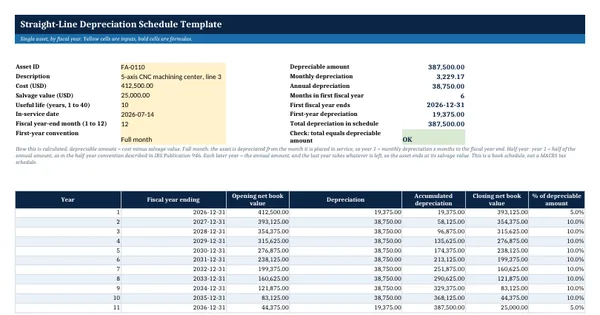
This Excel template has a single-asset calculator that builds the schedule by fiscal year for any year-end month, with a full-month or half-year first-year convention, and a multi-asset sheet that shows depreciation for eight calendar years across a group of assets, including disposals. Every figure is a live formula. The definitions of the conventions and the tax recovery periods referred to come from IRS Publication 946.
Who it is for
The accountant who needs a book depreciation schedule the auditor can recalculate, for one asset or the whole register, and has none that ties out.
What is inside
- Single-asset calculator: 8 input cells and 8 live outputs, including monthly and annual depreciation and a check that the total equals the depreciable amount
- Fiscal year schedule of up to 41 years with opening value, depreciation, accumulated depreciation, closing value and percent of the depreciable amount
- Two first-year conventions: full month from the in-service month, or half-year
- Any fiscal year-end month from 1 to 12
- Multi-Asset Schedule sheet: 10 worked sample assets plus 15 blank rows, depreciation for 8 calendar years, disposal dates and remaining amount
- A short how this is calculated note and a reference to IRS Publication 946 for the separate tax schedule
- Input cells in yellow, outputs in bold, print fit and frozen headers
How to use it
Enter the asset's cost, salvage value, useful life and in-service date in the yellow cells on the Depreciation Schedule sheet.
Files
- XLSXstraight-line-depreciation-schedule-template.xlsx19 KB
Opens in Microsoft Word or Excel, Google Docs or Sheets, and LibreOffice. Based on general finance practice, not on one published standard. A template to adapt, not legal, tax or accounting advice.
Questions about this template
What is the straight-line depreciation formula?
Annual depreciation equals cost minus salvage value, divided by the useful life in years. For an asset that cost 412,500 dollars with a 25,000 dollar salvage value and a 10 year life, that is 38,750 dollars a year, or about 3,229 dollars a month. In the first and last years the amount depends on the convention used, which this template lets you choose.
What is the half-year convention?
IRS Publication 946 describes the half-year convention as treating property as placed in service or disposed of at the midpoint of the tax year. In this book schedule it means a half year of depreciation in the first year and the remaining half in the year after the life ends. The full month option instead depreciates from the month the asset is placed in service.
Can I use this schedule for my tax return?
Not directly. For US federal tax most property is depreciated under MACRS, which uses its own recovery periods, conventions and percentage tables from IRS Publication 946, and may include section 179 or a special allowance. This template is a book schedule. Keep a separate tax schedule prepared by your tax preparer and reconcile the two.