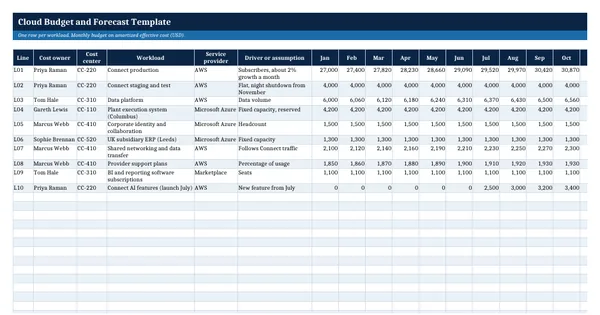
 Excel workbook preview
FinOps and cloud cost management
Cloud Budget and Forecast Template
3 free downloads per account. Just your email and a 6-digit code.
About this template
A cloud budget and forecast template sets the expected cloud spend for the year by workload and owner, tracks actual cost each month and projects where the year will land. It is needed when cloud spend is too variable for a single annual number, when the CFO asks for a full year forecast before the budget review, or when owners need to explain why their spend is running over. It keeps budget, actual and forecast for each workload on one row.
The workbook holds a monthly budget and monthly actual effective cost for each line. Formulas compute year to date figures, a three month run rate, a trend forecast with a monthly growth rate and the full year forecast with known changes. Variance status follows your own thresholds. Forecast accuracy uses the formula and sample KPIs from the Forecasting capability of the FinOps Framework, used under CC BY 4.0.
Who it is for
The finance manager or FinOps lead asked by the CFO for this year's cloud budget, the full year forecast and an explanation of the variance.
What is inside
- Budget sheet with 10 worked workload lines by month and 16 blank rows, full year totals by formula
- Actuals sheet for monthly effective cost with year to date totals that follow the last closed month
- Forecast sheet: 3 month run rate, a trend forecast with monthly growth, known changes and the full year forecast
- Variance to budget in currency and percent, with a green, amber or red status from your own thresholds
- Monthly View sheet with budget, actual and variance by month and a budget against actual line chart
- Forecast Accuracy sheet using the FinOps Framework formula, banded against its Crawl, Walk and Run sample KPIs
- Settings sheet for the fiscal year, last closed month, growth rate and variance thresholds
- Worked example for a company running a software product, plant systems and a UK subsidiary in the cloud
How to use it
Set the fiscal year and the last closed month on the Settings sheet, then replace the worked budget lines with your own workloads.
Files
- XLSXcloud-budget-and-forecast-template.xlsx26 KB
Opens in Microsoft Word or Excel, Google Docs or Sheets, and LibreOffice. Built on the FinOps Framework by the FinOps Foundation, published under the Creative Commons Attribution 4.0 licence (CC BY 4.0). Adapted and extended; not endorsed by the FinOps Foundation. A template to adapt, not legal, tax or accounting advice.
Questions about this template
How do you forecast cloud costs?
Start with the run rate of recent closed months, add the expected growth of usage, then add known changes such as a product launch, a migration or an expiring commitment. The FinOps Framework describes forecasts that mature from trend based to rolling and driver based models. This template uses a run rate with compound monthly growth plus a known changes column per line.
What is a good cloud forecast accuracy?
The FinOps Framework publishes sample KPIs for the variance between forecast and actual spend: below 20% at Crawl, less than 10% at Walk and less than 5% at Run. The Forecast Accuracy sheet bands each month against these samples. Agree your own target with Finance, because the right level depends on how variable your workloads are.
Should the cloud budget use billed cost or amortized cost?
Use amortized effective cost for budgets and forecasts so a prepaid commitment does not show as a spike in the month it was bought. The FinOps Framework advises forecast models built on discount adjusted, amortized data. Keep a separate cash view of upfront payments for the treasury forecast.