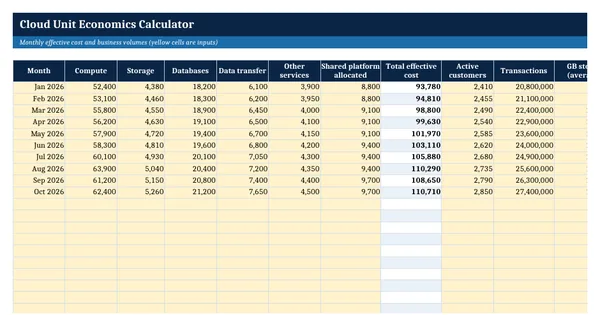
 Excel workbook preview
FinOps and cloud cost management
Cloud Unit Economics Calculator
3 free downloads per account. Just your email and a 6-digit code.
About this template
Cloud unit economics expresses cloud spend per unit of business value, such as cost per active customer or cost per thousand transactions. It answers whether growth is making each customer cheaper or more expensive to serve, which a total cloud bill cannot show. Finance teams need it for gross margin plans, pricing reviews and board questions about the cost to serve.
This calculator takes monthly effective cost in six lines and four business drivers, then calculates eight unit measures per month with a status against targets, a summary with trailing and year-to-date figures, and a twelve-month scenario. It follows the Unit Economics capability of the FinOps Framework from the FinOps Foundation (CC BY 4.0) and the Effective Cost definition of the FOCUS specification.
Who it is for
The finance manager or FinOps analyst asked by the CFO or the board what one customer costs to serve in the cloud and whether that is improving.
What is inside
- Monthly inputs sheet with 6 cost lines and 4 business drivers, 10 worked months plus 14 blank rows
- Unit metrics sheet with 8 live measures per month and a Green, Amber or Red status
- Summary sheet with 13 measures, including trailing three-month and year-to-date unit costs
- Scenario sheet that projects cost per customer in 12 months from growth, savings and price changes
- Targets and settings sheet with 5 input cells for targets and tolerance
- Input cells in yellow, outputs in bold, every output a live formula
- How this is calculated notes and a How to use sheet with the FinOps Framework credit
How to use it
Enter your targets on Targets and settings, then replace the ten worked months on Monthly inputs with your own effective cost and volumes.
Files
- XLSXcloud-unit-economics-calculator.xlsx18 KB
Opens in Microsoft Word or Excel, Google Docs or Sheets, and LibreOffice. Built on the FinOps Framework by the FinOps Foundation, published under the Creative Commons Attribution 4.0 licence (CC BY 4.0). Adapted and extended; not endorsed by the FinOps Foundation. A template to adapt, not legal, tax or accounting advice.
Questions about this template
What is a good unit metric for cloud cost?
Choose a unit that the business already counts and that drives the cost, such as active customers, transactions, orders or GB stored. The FinOps Framework suggests starting with technical efficiency metrics and moving to business metrics such as cost to serve once allocation is reliable.
Should unit cost use billed cost or effective cost?
Effective cost is usually better for unit metrics because it spreads commitment purchases and discounts over the usage they cover. Billed cost follows the invoice, so a prepaid commitment can make one month look expensive and the following months look cheap.
How do shared costs affect unit economics?
If shared platform, support and network costs are left out, unit costs look lower than they are. Allocate a fair share of shared costs to each product first, using the methods in your allocation policy, and include that share in the cost you divide by the unit.