 Excel workbook preview
FinOps and cloud cost management
Reserved Instances and Savings Plans Commitment Tracker
3 free downloads per account. Just your email and a 6-digit code.
About this template
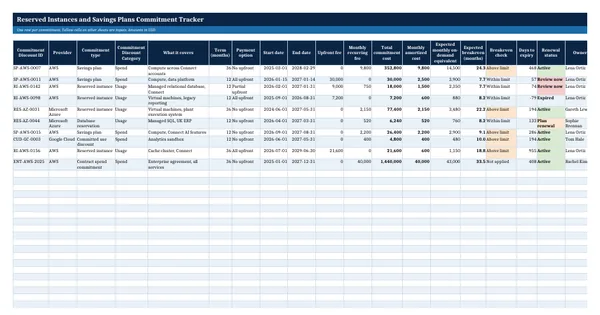
A commitment tracker lists every reserved instance, savings plan, committed use discount and contract spend commitment the organization holds, with its cost, term and expiry date, and shows each month whether the commitment is being used. It is needed when commitments are bought by several teams, when an auditor asks for the list of prepaid cloud contracts, or when nobody can say which commitments expire next quarter and whether to renew them.
The register records each commitment with the commitment category used in the open FOCUS specification. Formulas compute total and monthly cost, expected breakeven, days to expiry and renewal status. Monthly utilization and coverage sheets feed a summary with the commitment utilization, waste percentage and effective savings rate formulas from the Rate Optimization capability of the FinOps Framework, used under CC BY 4.0, and an expiry ladder by quarter.
Who it is for
The FinOps lead or controller asked by the CFO or the auditor what cloud commitments the company holds, whether they are used and when they expire.
What is inside
- Commitments register with 10 worked commitments and 20 blank rows: type, FOCUS commitment category, term, payment option and dates
- Total commitment cost, monthly amortized cost, expected breakeven and days to expiry by formula
- Renewal status that turns to Review now 90 days before expiry and Expired after the end date
- Monthly Utilization sheet with used and unused cost, utilization, waste and savings against on demand
- Coverage sheet with eligible and covered usage, coverage % and status against your target
- Summary sheet with utilization, waste %, effective savings rate and coverage for a chosen month
- Expiry ladder for 8 quarters showing how many commitments and how much monthly cost expire in each
- Settings sheet for the breakeven limit, utilization and coverage targets, with the FinOps Framework reference values
How to use it
Enter each active commitment on the Commitments sheet first, then add each month's used and unused cost from the provider's cost data.
Files
- XLSXreserved-instances-and-savings-plans-commitment-tracker.xlsx24 KB
Opens in Microsoft Word or Excel, Google Docs or Sheets, and LibreOffice. Built on the FinOps Framework by the FinOps Foundation, published under the Creative Commons Attribution 4.0 licence (CC BY 4.0). Adapted and extended; not endorsed by the FinOps Foundation. A template to adapt, not legal, tax or accounting advice.
Questions about this template
What is the difference between commitment utilization and coverage?
Utilization measures how much of what you committed to was actually used. Coverage measures how much of your eligible usage ran on a commitment rather than at on demand rates. High utilization with low coverage means you could commit more. High coverage with low utilization means you committed too much. The tracker measures both each month.
How is the breakeven of a cloud commitment calculated?
The template divides the total cost of the commitment over its term by the expected monthly on demand cost of the usage it covers. The result is the number of months of use at which paying on demand would have cost as much as the whole commitment. The FinOps Framework suggests buying commitments with a breakeven within 9 months to limit risk.
Why spread commitment expiry dates across the year?
If all commitments expire in the same month, a change in usage or pricing hits the whole portfolio at once. The FinOps Framework describes spreading purchases over the year so some commitments are always expiring, which keeps room to adjust. The expiry ladder on the Summary sheet shows how evenly your commitment cost expires by quarter.