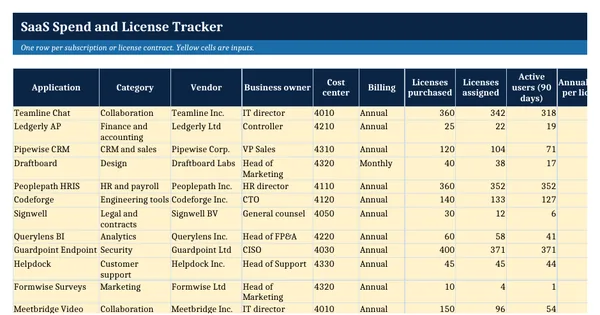
 Excel workbook preview
FinOps and cloud cost management
SaaS Spend and License Tracker
3 free downloads per account. Just your email and a 6-digit code.
About this template
A SaaS spend and license tracker lists every software subscription with what it costs, how many licenses are bought and used, and when it renews. It is needed when SaaS spend grows across departments without one view, when unused licenses renew automatically, or when the CFO asks which contracts can be cut before the next renewal. Most savings depend on acting before the notice deadline, not at the invoice.
This workbook holds a 21-column register with twelve worked subscriptions, calculated contract value, utilization, unused license cost and notice deadlines, status flags, a settings sheet and a summary by category and decision. It follows the Licensing and SaaS capability of the FinOps Framework from the FinOps Foundation (CC BY 4.0), including its license utilization and active to provisioned user measures.
Who it is for
The controller or IT finance manager asked by the CFO what the company spends on SaaS, how many licenses sit unused and which renewals are coming up.
What is inside
- 21-column register with 12 worked subscriptions and 20 blank formatted rows
- Annual contract value, license utilization, active to assigned ratio and unused license cost calculated
- Notice deadline and days to notice deadline calculated from renewal date and notice period
- Status formula turns Red or Amber on low utilization, few active users or a close deadline without a decision
- Dropdowns for 12 categories, billing type, auto-renewal and 6 decisions
- Settings sheet with 7 input thresholds
- Summary sheet with 10 measures, totals by category and by decision
- How to use sheet with the FinOps Framework credit and the affiliation note
How to use it
Set your thresholds on Settings, then replace the twelve example subscriptions with your own contracts and license counts.
Files
- XLSXsaas-spend-and-license-tracker.xlsx18 KB
Opens in Microsoft Word or Excel, Google Docs or Sheets, and LibreOffice. Built on the FinOps Framework by the FinOps Foundation, published under the Creative Commons Attribution 4.0 licence (CC BY 4.0). Adapted and extended; not endorsed by the FinOps Foundation. A template to adapt, not legal, tax or accounting advice.
Questions about this template
How do you measure SaaS license utilization?
Divide licenses assigned by licenses purchased for the utilization rate, and divide active users by assigned users to find dormant accounts. The FinOps Framework names both measures. A low first number means unassigned licenses, a low second number means people hold licenses they do not use.
Why track the notice deadline and not only the renewal date?
Many SaaS contracts renew automatically unless notice is given a set number of days before the renewal date. Once that deadline passes, the company is usually committed for another term at the same license count, so the decision to reduce or cancel has to be made before it.
Which SaaS costs should go in the tracker?
Include every recurring software subscription paid by the company, whether bought by IT, by a department on a card or through a cloud marketplace. Card and expense purchases are where duplicate tools and forgotten subscriptions usually hide, so review them with the accounts payable data once a quarter.