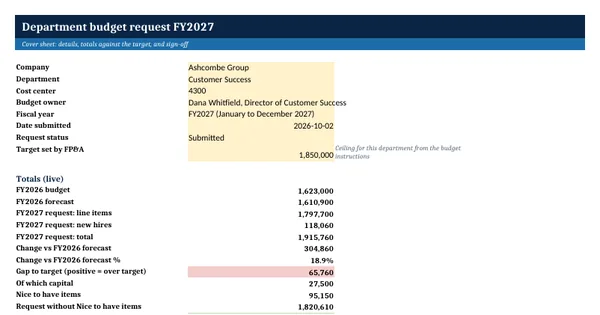
 Excel workbook preview
Budgeting, forecasting and FP&A
Department Budget Request Template
3 free downloads per account. Just your email and a 6-digit code.
About this template
A department budget request is the submission a budget holder sends to finance during the annual budget cycle. It sets out what the department wants to spend next year, how that compares with this year, and why. Finance teams ask every department head for one in the same format so that requests can be compared, totalled and cut fairly when the company total is above the target set by the CFO or the board.
This workbook gives the department head one place for the whole request. A cover sheet holds the details, the target and the sign-off. Line items carry a GL account, category, cost type, priority, quarterly amounts and a justification. New hires are costed from start month and loaded salary. A summary groups the request by category, cost type and priority and shows the effect of removing Nice to have items. It rests on general budgeting practice.
Who it is for
The department head asked by finance to submit next year's budget request with every line justified and ranked by priority.
What is inside
- Request cover sheet with department details, the FP&A target, live totals, gap to target, three justification fields and a sign-off table
- Line items register with 12 worked lines and 20 blank rows: GL account, category, cost type, priority, prior-year budget and forecast, and Q1 to Q4 amounts
- Change against the prior-year forecast in dollars and percent for every line, by formula
- New hires sheet with 3 worked requests and 12 blank rows, costed from start month, salary and employer cost rate
- Summary by category, by cost type (recurring, one-off, capital) and by priority, including new hires
- Cut scenario that shows the request without Nice to have items and the gap that remains against the target
- Dropdowns for category, cost type, priority, start month and request status
How to use it
Fill in the department details and the FP&A target on the Request sheet, then enter each cost line with its quarterly amounts.
Files
- XLSXdepartment-budget-request-template.xlsx18 KB
Opens in Microsoft Word or Excel, Google Docs or Sheets, and LibreOffice. Based on general finance practice, not on one published standard. A template to adapt, not legal, tax or accounting advice.
Questions about this template
What should a department budget request include?
It should show each cost line with its account, the amount by quarter, how it compares with this year's budget and forecast, whether it is recurring, one-off or capital, and a short reason. New positions should be costed separately. Finance also needs the department's own ranking of priorities so cuts, if needed, fall on the least important items first.
Why compare the request with the prior-year forecast and not the budget?
The forecast shows what the department is really spending this year, so it is the better base for next year. A request compared only with last year's budget can hide an overspend or an underspend. This workbook shows both prior-year figures and calculates the change against the forecast for every line.
How do I justify a budget increase?
Tie each increase to a cause finance can check: more customers, a new contract, a price rise from a supplier, a new system or an approved hire. State what happens if the line is cut. Ranking each line as Must have, Should have or Nice to have also shows finance that the department has already done its own prioritizing.