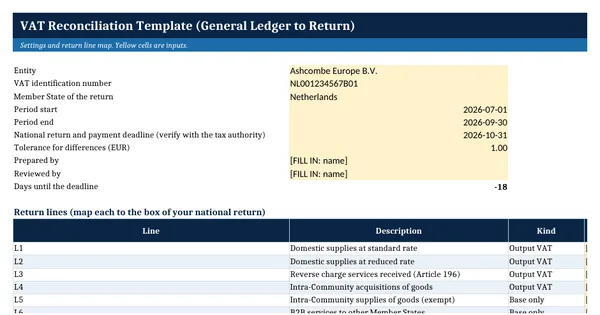
 Excel workbook preview
VAT Reconciliation Template (General Ledger to Return)
3 free downloads per account. Just your email and a 6-digit code.
About this template
A VAT reconciliation proves that the VAT return agrees with the accounting records. Each figure on the return should trace to the tax report by tax code, and the VAT control account in the general ledger should roll forward from the last return to this one. Auditors test it every year, and tax inspectors start there when they open a VAT audit.
This workbook works in four steps. The tax code report is mapped to generic return lines, which are compared with the filed return. Differences are explained by listed reconciling items, and the control account and revenue are tied out. Return lines follow the transaction types in Council Directive 2006/112/EC, so each user maps them to the box numbers of their own national return.
Who it is for
The accountant or controller who must show the auditor that each quarter's VAT return agrees with the general ledger and explain every difference.
What is inside
- Tax Code Report sheet with 11 worked tax codes and 14 blank rows, each mapped to a return line, with a rate check that flags VAT not equal to net times rate
- Return Lines sheet that compares base and VAT per tax report with the filed return for 8 return lines, with differences, explained amounts and a status
- Output VAT, input VAT and net payable totals per ledger and per return
- Control Account sheet that rolls the VAT payable account forward and ties revenue per GL to the sales bases on the return
- Reconciling Items sheet with 9 worked items and 16 blank rows, a type and status dropdown and an overdue highlight
- Settings sheet with the period, the national return deadline as a verify-before-use input and a tolerance
- How to use sheet with the reconciliation steps and the Directive references
How to use it
Enter the period on the Settings sheet, paste the ERP tax report by tax code, then type the filed return figures into the Return Lines sheet.
Files
- XLSXvat-reconciliation-template.xlsx19 KB
Opens in Microsoft Word or Excel, Google Docs or Sheets, and LibreOffice. Built on free, official texts that anyone can read: laws, regulations, standards and guidance published by public bodies. A template to adapt, not legal, tax or accounting advice.
Questions about this template
What is a VAT reconciliation?
It is a working paper that agrees the VAT return with the general ledger. It compares the base and VAT on every return line with the tax report by tax code, rolls the VAT control account forward and explains every difference. A reviewer should be able to follow it from the filed return to the ledger without asking questions.
Why does the VAT return not match the general ledger?
Common causes are invoices posted after the return was drafted, journals posted without a tax code, wrong VAT rates or amounts, non-deductible VAT booked as deductible, and reverse charge purchases that were never self-assessed. The template lists each one as a reconciling item with an action and a due date.
How often should VAT be reconciled?
At least for every VAT return period. Article 252 of the VAT Directive lets each Member State set a tax period of one, two or three months, or another period of no more than a year, and a deadline of no more than two months after it. Many teams reconcile monthly even when they file quarterly.