 Excel workbook preview
Budgeting, forecasting and FP&A
Headcount Plan Template
3 free downloads per account. Just your email and a 6-digit code.
About this template
A headcount plan lists every position the business expects to pay for in the coming year: current staff, approved and proposed hires, backfills and known leavers. People costs are usually the largest part of the operating budget, so the CFO, the board or a budget committee asks for the plan behind the salary line before the budget is approved. A good plan shows not only how many people, but when each one starts or leaves and what each costs.
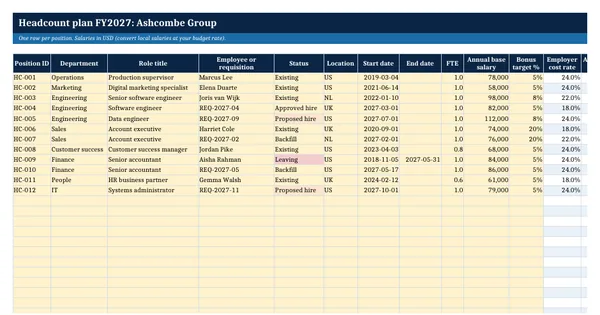
This workbook keeps one row per position with dates, FTE, salary, bonus target and an employer cost rate looked up by location. A monthly schedule prorates each position by the days employed in each month and applies a merit increase from a chosen date. A department summary shows monthly cost, FTE at the start and end of the year, hires and leavers. A single switch includes or excludes proposed hires. It rests on general financial planning practice.
Who it is for
The finance manager or HR business partner asked to turn next year's hiring plan into a monthly people cost that ties to the budget.
What is inside
- Positions register with 12 worked positions and 20 blank rows: department, role, status, location, start and end dates, FTE, salary and bonus
- Five status options (Existing, Approved hire, Proposed hire, Backfill, Leaving) and a switch to include or exclude proposed hires
- Employer cost rate looked up by location from the Assumptions sheet, and a fully loaded annual cost per position
- Monthly cost schedule for every position, prorated by the days employed in each month, with a merit increase from a chosen date
- Department summary of monthly cost for 8 departments, plus FTE at the start and end of the year, hires, leavers and cost per average FTE
- Dropdowns for department, status and location, and freeze panes and filters on the register
- All costs are live formulas; yellow cells are the only inputs
How to use it
Set the plan year start, merit increase and employer cost rates on the Assumptions sheet, then list every position on the Positions sheet.
Files
- XLSXheadcount-plan-template.xlsx26 KB
Opens in Microsoft Word or Excel, Google Docs or Sheets, and LibreOffice. Based on general finance practice, not on one published standard. A template to adapt, not legal, tax or accounting advice.
Questions about this template
What is a fully loaded cost per employee?
It is the total annual cost of a position to the employer, not only the base salary. It adds the bonus target and the employer's taxes, benefits and pension contributions. This workbook applies an employer cost rate by location, which you set from your payroll provider's figures, so that the plan matches what the budget will actually pay.
How do I budget for a hire who starts mid-month?
Prorate the cost by the days employed in that month. A hire who starts on the 17th of a 31-day month costs 15/31 of a full month. The monthly cost schedule in this workbook does this for every start and end date, so a late start or a known leaving date changes the cost automatically.
Should proposed hires be in the headcount budget?
That is a policy choice. Some companies budget only approved positions and hold proposed hires in a separate request. Others include them so the budget shows the full ask. This workbook has a Yes or No switch on the Assumptions sheet that includes or removes every proposed hire from the cost and FTE figures at once.