 Excel workbook preview
Budgeting, forecasting and FP&A
Rolling 12-Month Forecast Template
3 free downloads per account. Just your email and a 6-digit code.
About this template
A rolling 12-month forecast always looks one full year ahead. Each month, after the books close, the oldest forecast month becomes an actual and a new month is added at the far end. Finance teams use it when the annual budget has gone stale by the second quarter, or when the board, a lender or the CFO wants to see the next four quarters rather than only the rest of the fiscal year.
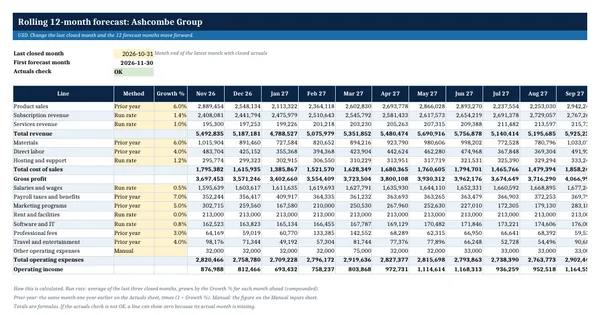
This workbook keeps monthly actuals on one sheet and builds the forecast from them. One input, the last closed month, sets the 12 forecast months. Each line uses one of three methods: a run rate from the last three actual months with monthly growth, the same month last year with a growth rate, or manual figures. A summary compares the trailing 12 months with the next 12, and a log records each cycle. It rests on general financial planning practice.
Who it is for
The FP&A analyst or finance manager asked to replace a stale annual budget with a forecast that always looks 12 months ahead.
What is inside
- Forecast sheet that sets 12 forward months from one input, the last closed month, so the window rolls when that date changes
- Three methods per line from a dropdown: Run rate (3-month average with monthly growth), Prior year (same month last year plus growth) and Manual
- Actuals sheet with 24 months of worked actuals for 14 P&L input lines plus 5 calculated totals, and 12 further month columns ready for new actuals
- Live check that warns when actuals for the last closed month are missing
- Manual inputs sheet for lines forecast by hand, linked into the forecast month by month
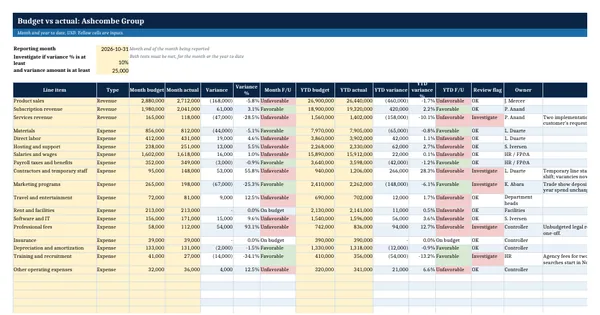
- Summary sheet: trailing 12 months actual against next 12 months forecast for every line, margins, and the next four quarters
- Forecast log with 8 worked forecast cycles and 16 blank rows, with a formula for the change against the previous cycle
- Total revenue, gross profit, operating expenses and operating income calculated by formula on every sheet
How to use it
Paste your own monthly actuals into the Actuals sheet, then set the last closed month on the Forecast sheet.
Files
- XLSXrolling-12-month-forecast-template.xlsx24 KB
Opens in Microsoft Word or Excel, Google Docs or Sheets, and LibreOffice. Based on general finance practice, not on one published standard. A template to adapt, not legal, tax or accounting advice.
Questions about this template
How is a rolling forecast different from an annual budget?
An annual budget covers a fixed fiscal year and is usually set once. A rolling forecast always covers the next 12 months, so it is updated every month or quarter and never runs down to a few remaining months. Many teams keep both: the budget as the approved target and the rolling forecast as the current best estimate.
Which forecasting method should each line use?
Use the method that matches how the line behaves. Steady or growing lines such as subscription revenue, salaries and software suit a run rate with a growth rate. Seasonal lines such as product sales, marketing and professional fees suit the same month last year plus growth. One-off or contract-driven lines are better entered by hand on the Manual inputs sheet.
How often should a rolling forecast be updated?
Most teams update it monthly, a few working days after the books close, so that the latest actual month replaces a forecast month. Smaller teams sometimes update quarterly. What matters is a fixed rhythm: actuals loaded, methods and growth rates reviewed, the result compared with the previous cycle, and the cycle recorded in the log.